
logologo
search_icon
search_iconAll
search_iconContinue Playing
search_iconHot Games
search_iconNew Games
search_iconSimulation
search_iconAdventure
search_iconAction
search_iconStrategy
search_iconCasual
search_iconRacing
search_iconPuzzle
search_iconSports
search_iconMore
AboutAbout
BusinessBusiness
PrivacyPrivacy
TermsTerms

© 2026 minigame.com

mascot

Join The Minis With Friends

search_icon
search_icon
search_icon
search_icon
search_icon
search_icon
search_icon
search_icon
search_icon
search_icon
search_icon
search_icon
more_icon
AboutBusinessPrivacyTerms
logo
Remove Arrow

Remove Arrow

Recommended
Bubble it Jam
Jelly Merge
Flower Match 3
Mouse Hole
Drag The Block
Slices
Stone Link
Color Water Sort
Halloween Craft
Halloween Blocks
Halloween 2048
Mahjong Connect Halloween
Dodo Mart
Brain Shredder
Fruit Agent
Block Puzzle Tropical Story
Remove Arrow

Remove Arrow

5puzzlePuzzle
Play Now
Like
Dislike
Add to favorites
Feedback
Remove Arrow
Merge Dice

Merge Dice

Merge Dice
Merge Dice407.7K
Cat Defenders: Shelling Snake

Cat Defenders: Shelling Snake

Cat Defenders: Shelling Snake
Cat Defenders: Shelling Snake899.6K
One Line

One Line

One Line
One Line649.2K
Draw Color

Draw Color

Draw Color
Draw Color266.0K
Farm Escape

Farm Escape

Farm Escape
Farm Escape551.8K
Help The Duck

Help The Duck

Help The Duck
Help The Duck885.1K
Follow My Command

Follow My Command

Follow My Command
Follow My Command807.7K
Brain Flex

Brain Flex

Brain Flex
Brain Flex466.3K
Sheep Sheep

Sheep Sheep

Sheep Sheep
Sheep Sheep401.3K
Small Wardrobe

Small Wardrobe

Small Wardrobe
Small Wardrobe230.4K
AboutBusinessPrivacy
logo

© 2026 minigame.com

Games>
Puzzle>
Remove Arrow

Remove Arrow

Rating
5
Orientation
Portrait
Release Date
2023-10-31
Puzzle

What is Remove Arrow

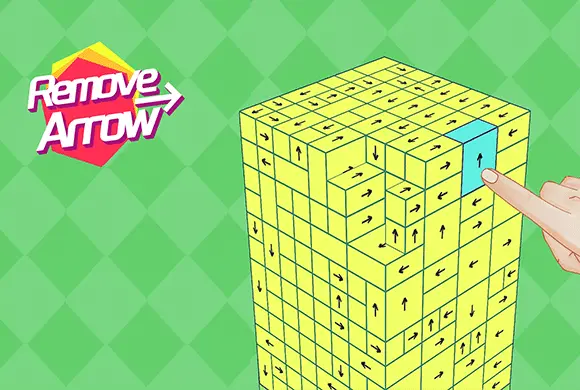
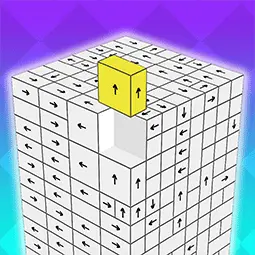
Remove Arrow is a captivating 3D puzzle game designed to test your spatial reasoning and strategic thinking. The core objective is simple yet profoundly engaging: clear a complex structure made of blocks by tapping them away. However, each block can only move in the specific direction indicated by the arrow on its face. If a block's path is obstructed by another, it remains stuck, requiring you to carefully plan the order of your moves. As you progress, the simple clusters evolve into massive, intricate cubes with hundreds of interlocking pieces, providing a satisfying "difficulty spike" that keeps your brain sharp. With clean, minimalist visuals and smooth rotation mechanics, Remove Arrow offers a Zen-like focus combined with a genuine mental workout. It's the perfect game for puzzle enthusiasts looking for a portable, instant-play challenge on any device.

Key Game Features

Intuitive Spatial Puzzles:Navigate complex 3D structures where every move counts. Success depends on your ability to visualize paths and understand how blocks interlock in a three-dimensional space for efficient clearing. Escalating Difficulty Spikes:Start with small, manageable clusters and advance to massive cubes filled with hundreds of arrows. The game constantly introduces new layouts to keep the challenge fresh and rewarding. Smooth 3D Rotation:Effortlessly rotate the entire puzzle 360 degrees to find hidden paths. This fluid control system ensures you can inspect the structure from every angle to plan your next move. Strategic "Unlocking" Order:It's not just about tapping; it's about the sequence. Identify which blocks are free to move and which are blocked, creating a chain reaction that unravels the entire structure.

How to Play & Master

The goal is to remove all blocks from the screen. Tap on a block to send it flying in the direction of its arrow. If it hits another block, it stays. Rotate the structure to find blocks with clear exit paths.

Game Controls

Tap: Remove a block. Swipe: Rotate the 3D structure to view different sides. Icons: Use power-ups like "Direction Change" or "Bomb" to clear difficult sections.

Frequently Asked Questions (FAQ)

Q: Why won't some blocks move when I tap them? A: A block is stuck if another block is in the way of its arrow's path. You need to remove the obstructing blocks first! Q: Is there a time limit? A: Yes, higher levels feature a countdown timer to test your speed and precision. Keep an eye on the clock at the top! Q: What do the special icons at the bottom do? A: These are power-ups! They can help you rotate arrows or clear groups of blocks when you find yourself in a tight spot.